
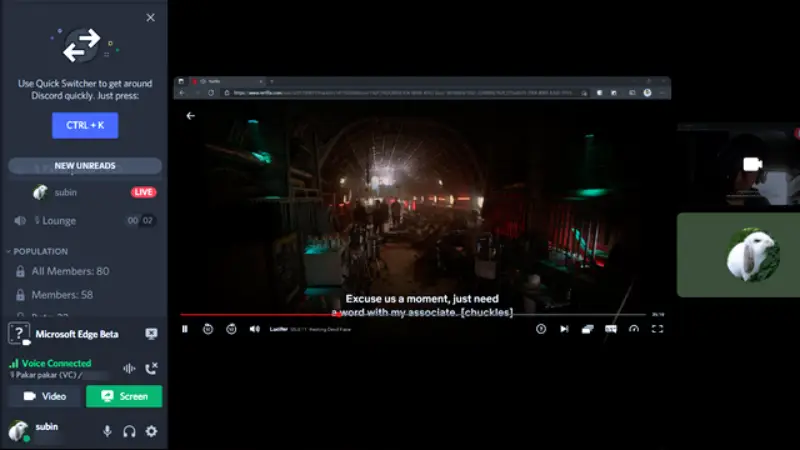

In the digital age, movie nights are no longer restricted by physical distance. Whether your best friend lives across the street or across the ocean, Discord has become the go-to platform for virtual hangouts. However, if you’ve ever tried to share your screen while watching your favorite series, you’ve likely run into the dreaded “black screen” issue.
In this guide, we will walk you through exactly how to stream Netflix on Discord in 2026, including how to fix common audio/visual bugs and how to set up the perfect watch party on Windows, Mac, and even mobile.
Why Does My Netflix Stream Show a Black Screen on Discord?
Before we dive into the “how-to,” it’s important to understand the “why.” The primary reason you see a black screen when trying to stream Netflix on Discord is Digital Rights Management (DRM).
Netflix uses DRM to prevent unauthorized distribution of its content. When Discord’s screen-sharing feature detects a DRM-protected video player, it intentionally blocks the visual feed, leaving your friends with audio but no video. To bypass this, we need to adjust a few technical settings in your browser and the Discord app itself.
How to Stream Netflix on Discord (Step-by-Step for PC & Mac)
For the best experience, we recommend using a desktop browser (like Google Chrome or Firefox) rather than the official Netflix Windows app.
Step 1: Disable Hardware Acceleration in Your Browser
This is the most critical step. Hardware acceleration offloads tasks to your GPU, which triggers the DRM black screen.
For Google Chrome:
- Open Chrome and click the three vertical dots in the top-right corner.
- Select Settings.
- On the left sidebar, click System.
- Toggle off “Use graphics acceleration when available” (formerly Hardware Acceleration).
- Click Relaunch.
For Mozilla Firefox:
- Click the three horizontal lines and go to Settings.
- Stay on the General tab and scroll down to Performance.
- Uncheck “Use recommended performance settings”.
- Uncheck “Use hardware acceleration when available”.
Step 2: Disable Hardware Acceleration in Discord
To ensure a smooth frame rate and avoid crashes, you should also disable this within Discord.
- Open Discord and click the User Settings (gear icon) at the bottom left.
- Scroll down to Advanced under the App Settings section.
- Toggle off Hardware Acceleration. Discord will prompt you to restart.
Step 3: Add Your Browser as a Registered Game
Discord’s “Go Live” feature works best when it recognizes an application as a game.
- Keep your browser open on the Netflix homepage.
- In Discord Settings, go to Registered Games.
- Click “Add it!” and select your browser (Chrome, Firefox, etc.) from the dropdown menu.
- Click Add Game.
Step 4: Start the Stream
- Join a Voice Channel in your Discord server.
- Click the Stream icon (the small monitor with an arrow) located above your username.
- Select your browser window.
- Choose your resolution (720p for free users, 1080p/4K for Nitro) and click Go Live.
How to Stream Netflix on Discord Without Black Screen: Troubleshooting Sound
One common complaint when learning how to watch Netflix on Discord with friends is that the video works, but there is no sound.
- Share the Application, Not the Screen: Never share your “Entire Screen.” Always select the specific browser “Window” or “Tab” in the Discord streaming menu. This allows Discord to capture the internal audio of that application.
- Check Discord Audio Settings: Go to Settings > Voice & Video. Scroll down to the bottom and ensure “Experimental Method to capture audio from applications” is toggled ON.
- Update Drivers: Ensure your audio and graphics drivers are up to date in Windows Device Manager.
Read also this: Roblox Condo Discord
Can You Stream Netflix on Discord Mobile? (Android & iOS)
Streaming Netflix from a mobile device is significantly more difficult due to the strict DRM built into the Netflix mobile app.
- The Official App Won’t Work: If you try to screen share the Netflix app on iPhone or Android, it will almost certainly be blacked out.
- The Browser Workaround: Try logging into Netflix via a mobile browser (like Safari or Chrome) and sharing your screen from the Discord mobile app.
- The Best Solution: For the highest quality, we always recommend hosting from a PC or Mac and having mobile users join as viewers. Viewers on mobile can watch a PC-hosted stream without any issues.
Tips for the Best Discord Netflix Watch Party
To make your movie night professional and lag-free, follow these pro tips:
| Tip | Benefit |
| Use Discord Nitro | Allows you to stream in 1080p or 4K with 60fps for a cinematic experience. |
| Close Unused Tabs | Netflix and Discord are resource-heavy; closing extra tabs prevents lag. |
| Use a Wired Connection | Ethernet is always more stable than Wi-Fi for high-bandwidth streaming. |
| Set a “Movie Night” Role | Use Discord roles to notify your friends when the stream is starting. |
Is it Legal to Stream Netflix on Discord?
While Discord allows screen sharing, streaming copyrighted content like Netflix technically falls into a grey area of “Public Performance.” According to Netflix’s Terms of Service, their content is for personal, non-commercial use.
However, hosting a private stream for a small group of friends is a common practice. To stay safe:
- Keep your stream private to your friends/server.
- Do not host public streams for hundreds of strangers.
- Never charge money for access to your Discord stream.
Summary of Key Steps
- Turn off Hardware Acceleration in your browser and Discord settings.
- Add your browser as a “Game” in Discord’s Activity Settings.
- Join a Voice Channel and select the “Go Live” button.
- Select the Browser Window (not the whole screen) to ensure audio is shared.
Streaming your favorite movies on Discord is a fantastic way to bond with your community. By following the steps above, you can bypass the black screen and enjoy a seamless viewing experience with your friends.
Frequently Asked Questions
Q: Can I stream Netflix on Discord using Safari?
A: It is not recommended. Safari has very strict DRM protections. Chrome or Firefox are the most reliable options for bypassing the black screen.
Q: Why is my stream lagging?
A: Lag is usually caused by slow upload speeds or high CPU usage. Try lowering the stream quality to 720p and 30fps in the Discord Go Live settings.
Q: Do my friends need a Netflix account to watch my stream?
A: No. Only the person hosting the stream needs a Netflix account. Your friends are simply viewing your screen share.
For more related topics: https://mirsft.com/