
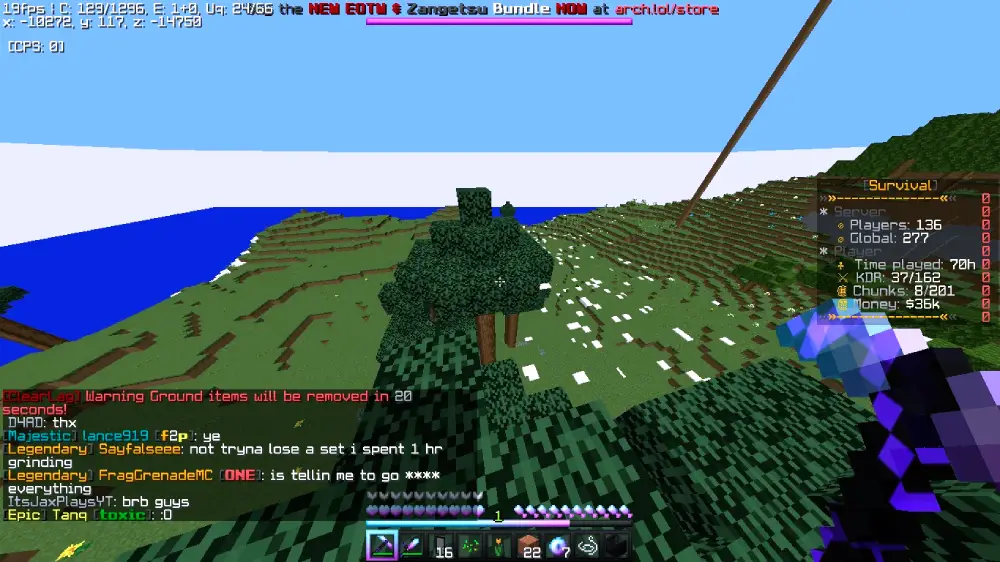

For many gamers, the blocky world of Minecraft is the ultimate escape. However, strict firewalls at schools and offices often stand in the way of building your next masterpiece. Enter Eaglercraft Unblocked, a revolutionary web-based port that brings the full Minecraft experience directly to your browser.
In this comprehensive guide, we’ll explore what Eaglercraft is, how to play it safely on restricted networks like Chromebooks, and why it remains the top choice for unblocked gaming in 2026.
What is Eaglercraft Unblocked?
Eaglercraft is a highly sophisticated, unofficial port of Minecraft Java Edition (specifically version 1.8.8) that runs entirely in a web browser. Unlike “clones” that merely mimic the look of the game, Eaglercraft is built using TeaVM, which compiles the original Java bytecode into JavaScript and WebAssembly.
This means when you play Eaglercraft unblocked, you aren’t just playing a knock-off; you are playing a version of Minecraft that supports:
- Singleplayer & Multiplayer: Create your own worlds or join massive community servers.
- Survival & Creative Modes: Whether you want to fight the Ender Dragon or build a scale model of the Eiffel Tower, the mechanics are identical to the original.
- Skins & Capes: Customize your character just like you would on the official Mojang launcher.
Why Eaglercraft is the Best Choice for Schools and Work
The primary reason players seek out Eaglercraft unblocked is its ability to bypass traditional network filters. Schools often block the official Minecraft website and prevent users from installing .exe or .msi files.
Because Eaglercraft is essentially just a collection of HTML5 and JavaScript files, it can be hosted on various platforms that schools rarely block, such as:
- GitHub Pages: A developer favorite for hosting clean versions of the game.
- Google Sites: Since schools rely on Google Workspace, they often cannot block the
sites.google.comdomain without breaking educational tools. - Local HTML Files: You can actually download Eaglercraft as a single
.htmlfile and run it from a USB drive or your desktop—no internet required to play singleplayer.
Read also this: Integrate GitHub Enterprise with Jira
How to Play Eaglercraft Unblocked in 2026
Getting started is surprisingly simple. Follow these steps to jump into the game:
Step 1: Find a Reliable Mirror
Search for “Eaglercraft Unblocked” or “Eaglercraft 1.8.8” on a search engine. Look for reputable community-hosted links. Popular domains often include variations like eaglercraft.com or eaglercraft.q13x.com.
Step 2: Initialize the Game
When you first load the page, the browser will download the game assets into your IndexedDB (local browser storage). This might take a minute depending on your connection.
Step 3: Setup Your Profile
Once loaded, you can enter your username and upload a custom skin. Note that since this isn’t connected to official Microsoft accounts, your “official” Minecraft skin won’t appear unless you manually upload the file.
Step 4: Join a Server or Create a World
Navigate to “Multiplayer” to see a list of pre-added servers. Popular networks like ArchMC or Zentic offer game modes like BedWars, SkyWars, and Survival.
Key Features of Eaglercraft 1.8.8
While Minecraft is currently on much newer versions, 1.8.8 remains the “Golden Age” for many players, particularly those interested in PvP (Player vs. Player) combat. Here is what you get:
| Feature | Description |
| No Attack Cooldown | Enjoy the classic “click-fast” combat mechanics from before the 1.9 update. |
| Browser Performance | Optimized to run on low-end hardware, including school-issued Chromebooks. |
| Integrated Voice Chat | Many Eaglercraft servers support proximity-based voice chat directly through the browser. |
| Cross-Platform | Works on Windows, macOS, Linux, and even mobile browsers (though controls are tricky). |
Safety and “Unblockability” Tips
If your school’s IT department is particularly strict, you might find that even the common Eaglercraft links are blocked. Here are three pro-tips to stay unblocked:
1. The Offline HTML Method
You can find “offline” versions of Eaglercraft on GitHub. Download the .html file at home and save it to a USB drive. At school, just double-click the file. Since it’s running locally, your school’s web filter (like GoGuardian or Securly) often won’t even see the traffic.
2. Turn Off Wi-Fi for Singleplayer
If you have already loaded the game once, the files are stored in your browser’s memory. You can actually turn off your Wi-Fi, refresh the page, and play Singleplayer. This prevents monitoring software from tracking your activity.
3. Use a Web Proxy
If the site itself is blocked, using a “web proxy” or a “node unblocker” can help you access the Eaglercraft URL by masking the destination address from the school’s firewall.
Eaglercraft vs. Minecraft Classic
Many people confuse Eaglercraft with Minecraft Classic (the official web version released by Mojang). There is a huge difference:
- Minecraft Classic is limited to the very first version of the game. You can only build with 32 types of blocks, there are no mobs (creepers/zombies), and there is no survival mode.
- Eaglercraft Unblocked is a full game. It includes The Nether, The End, Redstone, Enchanting, and complex multiplayer plugins.
Common Troubleshooting
- Game is Laggy: Eaglercraft relies heavily on your browser’s RAM. Close other tabs (especially YouTube or Discord) to free up resources.
- World Didn’t Save: Always make sure you aren’t in “Incognito” or “Private” mode. These modes delete your local storage once the tab is closed, meaning your worlds will be lost forever.
- Multiplayer Connection Refused: This usually happens if the server is down or if your school’s firewall is blocking the specific “WebSocket” the game uses to communicate.
The Future of Eaglercraft in 2026
As we move through 2026, the Eaglercraft community continues to grow. Developers are working on EaglercraftX 1.12.2, which aims to bring even more features like Concrete blocks, Llamas, and better optimization. Despite legal pressures from larger corporations, the open-source nature of the project means that as soon as one site is taken down, ten more appear.
Eaglercraft unblocked represents more than just a game; it is a testament to the creativity of the gaming community, ensuring that everyone has access to a digital sandbox, regardless of their network restrictions.
Conclusion
Eaglercraft unblocked is the ultimate solution for anyone looking to play Minecraft in a browser. With its faithful recreation of the 1.8.8 experience, robust multiplayer support, and clever ways to bypass filters, it remains the king of unblocked games. Whether you’re looking to kill time during a study hall or want to collaborate on a build with friends across the world, Eaglercraft is your gateway to limitless creativity.
For more related topics: https://mirsft.com/