
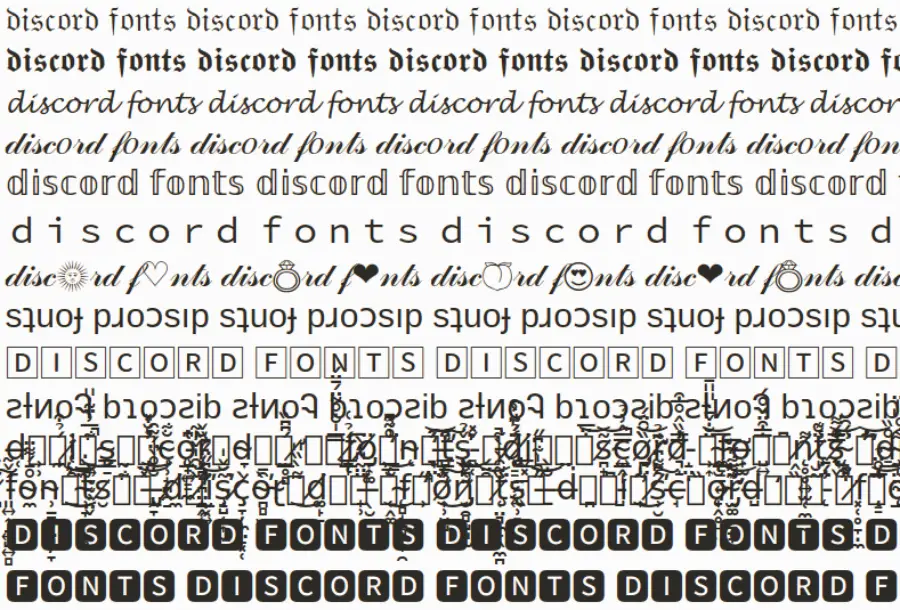

In the world of digital communities, your identity is defined by how you present yourself. Whether you’re a professional community manager or a casual gamer, discord fonts are one of the most effective ways to make your profile, server, and messages pop.
Standard text can get lost in the noise of a busy server. By using unique text styles, you can grab attention, organize information better, and express your personality. In this comprehensive guide, we’ll dive deep into everything you need to know about customizing your text on Discord.
What are Discord Fonts?
When people talk about discord fonts, they are usually referring to two distinct things:
- Markdown Formatting: Using built-in symbols to make text bold, italicized, or underlined.
- Unicode “Fonts”: Using external generators to create “fancy” text that relies on special Unicode characters to mimic different typefaces.
While Discord uses gg sans as its official UI font, the platform supports a wide range of Unicode characters, allowing you to “change” your font in bios, nicknames, and channel names.
The Best Discord Font Generators
If you want to use cursive, gothic, or bubbly text, a discord font generator is your best friend. These tools take standard Latin characters and map them to visually similar Unicode symbols.
Top Tools to Use:
- LingoJam: A classic, easy-to-use interface for quick copying and pasting.
- FontVilla: Offers a massive variety of aesthetic styles, including “glitch” and “small caps.”
- DiscordFont.com: Specifically optimized to ensure characters render correctly on both desktop and mobile versions of Discord.
How to Use a Font Generator:
- Type your desired message into the generator website.
- Browse the list of generated styles.
- Click Copy on the style you like.
- Paste it into your Discord bio, nickname, or message bar.
Built-in Discord Text Formatting (Markdown)
Before reaching for an external generator, it’s essential to master Discord’s native formatting. Discord uses a simple language called Markdown to style text.
The Cheat Sheet
| Style | Syntax | Result |
| Italics | *text* or _text_ | Italicized text |
| Bold | **text** | Bold text |
| Bold Italics | ***text*** | Bold & Italicized |
| Underline | __text__ | Underlined text |
| Strikethrough | ~~text~~ | ~~Strikethrough text~~ |
| Spoiler | ` |
Headers and Lists
In 2023, Discord introduced expanded Markdown features that allow you to create structured content:
- # Big Heading: Use one
#followed by a space. - ## Medium Heading: Use two
##followed by a space. - ### Small Heading: Use three
###followed by a space. - Lists: Use
-or*at the start of a line to create bullet points.
Advanced Formatting: Blockquotes and Code Blocks
To truly master discord text formatting, you need to know how to use blocks. This is perfect for server rules, announcements, or sharing snippets of code.
Single-Line Blockquotes
Use the > symbol at the start of a line to indent it.
This is a blockquote.
Multi-Line Blockquotes
Use >>> at the start of a paragraph to indent everything that follows.
Code Blocks
To put text in a “box” (monospaced font), use backticks (`).
- Single Line:
`Message` - Multi-Line: “`This is acode block.
Read also this: Grow a Garden Values
Why Use Discord Fonts in Your Bio and Nickname?
Your discord bio fonts are the first thing people see when they click on your profile. Using a unique style can help you:
- Establish a Brand: If you are a streamer or content creator, a consistent font helps with brand recognition.
- Organize Information: Use bold or small caps to separate your “About Me,” “Socials,” and “Specs.”
- Stand Out in Member Lists: A unique nickname font makes you easier to find in a list of hundreds of users.
Pro Tip: Don’t overdo it. If your font is too “fancy,” it may become unreadable for users with screen readers or on certain mobile devices.
Creative Ways to Use Fancy Text for Discord
Beyond just looking cool, fancy text for discord has functional uses within server management.
1. Channel Categorization
Use bold or aesthetic fonts to name your channels. For example:
╔════ ≪ •❈• ≫ ════╗𝕀ℕ𝔽𝕆ℝ𝕄𝔸𝕋𝕀𝕆ℕ╚════ ≪ •❈• ≫ ════╝
2. Role Names
Assigning special fonts to roles (like Aᴅᴍɪɴ or V.I.P) makes the roles look more prestigious and visually separates them in the sidebar.
3. Server Rules
Using Headers (#) and code blocks makes your rules much easier to read than a giant wall of plain text.
Common Issues with Discord Fonts
While discord fonts are great, they come with a few caveats that every power user should know.
1. Searchability
If you change your nickname to 𝔍𝔬𝔥𝔫, people won’t be able to find you by typing “John” in the search bar. This can make it difficult for moderators to tag you or for friends to find you.
2. Screen Reader Accessibility
Users who are visually impaired use screen readers. These devices often struggle to read Unicode characters. Instead of reading “Hello,” the device might say “Mathematical Bold Script Capital H…” which can be very frustrating for the listener.
3. Device Compatibility
Not all devices support every Unicode character. Some older Android phones or outdated browsers might show “tofu” (those little empty boxes □) instead of your cool font.
How to Change the Discord System Font
Technically, Discord does not allow you to change the system font (gg sans) within the app settings for security reasons. However, there are two workarounds:
- Appearance Settings: You can go to User Settings > Appearance to adjust the “Chat Font Scaling” and “Space Between Message Groups.” This doesn’t change the font face, but it changes the readability.
- BetterDiscord (Use with Caution): Some users use a third-party client called BetterDiscord to apply custom CSS themes.
- Warning: Using third-party clients is technically a violation of Discord’s Terms of Service. Proceed at your own risk.
Best Practices for Using Discord Fonts in 2026
To ensure your text looks great and remains functional, follow these simple rules:
- Mix and Match: Use a discord font generator for your name, but stick to standard Markdown for your messages.
- Prioritize Readability: If you can’t read it at a glance, neither can anyone else.
- Test on Mobile: Always check how your server layout looks on a phone, as text wraps differently on smaller screens.
- Avoid “Glitch” Text in Bios: Excessive “Zalgo” or glitch text can actually lag the app for some users.
Conclusion
Customizing your discord fonts is the easiest way to level up your presence on the platform. Whether you are using a discord font generator for a catchy nickname or mastering discord text formatting to build a professional server, these tools give you the creative freedom to express yourself.
By balancing “fancy” styles with readable Markdown, you can create a profile and a community that is both beautiful and accessible.
Frequently Asked Questions
Can I get banned for using a discord font generator?
No. Using Unicode characters is perfectly safe and does not violate Discord’s TOS.
Why does my font look like boxes?
This usually means the device or operating system you are using doesn’t support that specific Unicode character set. Try a more common “fancy” font style.
How do I make text colorful on Discord?
To use color, you must use code blocks with syntax highlighting (e.g., “`ansi or “`diff). This is more advanced but very effective for server announcements.
For more related topics: https://mirsft.com/